
What is Activa TSP ?
Generally speaking a TAPI Service Provider (TSP) is a 'driver' that enables Microsoft TAPI to communicate to a telephony device such as a switch or modem.
So Activa Asterisk TSP enables TAPI and TAPI-compatible applications to use the Asterisk IP-PBX: Microsoft Outlook, ACT!, TapiCall, MS Dialer,...
Differences between Activa and ActivaTSP ?
"Activa" was intended to name the hole project, wich started as a couple of c++ classes, a simple test tool and a tapi service provider (TSP).
So Activa TSP (or activaTsp) really refers to the TSP part of the "activa" deliverables.
Some time after we started the activa sourceforge project we recognized that the "activa tsp" part was probably the most interesting one to most users, so we started packing it into a different 'sourceforge release' called 'activatsp' and included a nsis setup utility to ease deployment. Nowadays, the 'activa' downloads still include all activa bin/source including the tsp.
How can I install Activa TSP ?
Oct, 2007
Download the ActivaTSP package, and unzip it in a temp folder.
Run the included setup application setupActivaTSP.exe. This will copy required files and register the TSP to TAPI.
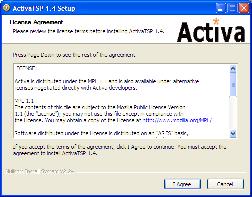
After setup has finished, reboot Windows.
Go to Windows Control Panel | Phone and Modem Options | Advanced Settings
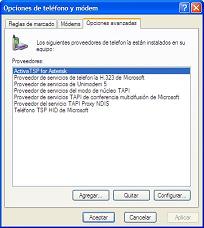
Select "ActivaTSP for Asterisk" and click 'configure'
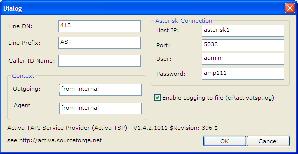
Configure the activaTSP required parameters:
- DN: extension (ie: 418). You may also set it to a full channel specification (ie: SIP/201), but this has not been fully tested.
- Line Prefix: this string gets prefixed to 'LineDN' to form TSP line name. Ex: if line_prefix=AST and line_dn=201 the line will appear to TAPI applications as AST201.
- CallerIDName: caller identification sent when originating calls from this line. Ex: 'Joe Doe'.
- Context (outgoing): context used to dial outgoing calls (ex: from-internal)
- Context (agent): context used to login/logout agents to queues (ex: from-internal)
- Asterisk Connection (HostIP, Port, User, Password): parameters to connect to Asterisk Manager API.
- Enable Logging to file: Enables logging to "install_dir\activaTSP.log" by default, else to the location pointed by logFilePath registry key and if logFilePath don't exists in c:\activaTSP.log
Default options will work on most Asterisk/Asterisk@Home/Trixbox configurations.
ActivaTSP stores its parameters in the windows registry under the HK_LM/software/activa/activatsp key.
How to configure multiple lines ?
You have two ways to configure multiple lines in ActivaTSP:
1.-Ussing expressions
From 1.4.4 ActivaTsp supports simple expressions to generate multiple lines.
Rules:
- ONLY numbers, comma and dash are allowed in expressions. (1,2,3,4,5,6,7,8,9,0,',','-')
- Dashes define intervals. Ex: "400-405" define 5 lines -> 400,401,402,403,405
- Comma separate lines or intervals. Ex "400,401,402" define 3 lines -> 400,401,402
- You will need to restart activatsp after editing any expression.
More complex example:
Expression: 400-405,100,101,200,303-306.
Generate: 400,401,402,403,405,100,101,200,303,304,305,306.
2.-Creating multiple DNs in registry
While ActivaTSP configuration DIALOG allows for a single line configuration, you can configure activatsp to handle a number of lines via the registry.
Confuration is stored in the HKLM/software/activa/activaTSP registry folder.
- Create or edit a DWORD value "numLines" and set it to the number of lines (for example: "10")
- Create or edit STRING values: "dn1", "dn2", ... (dn0 is first 'line dn' and is what you see through configuration dialog).
- Optionally you can also set calleridname1, calleridname2, ... STRING values
- You will need to restart activatsp after editing the registry.
Ex:
"dn0" = "311"
"dn1" = "312"
"dn2" = "SIP/313"
"dn3" = "SIP/314"
"numLines" = 4
This will enable a tapi application to open tapi lines "311", "312", "SIP/313" and "SIP/314".
Mixing expresions in multiple DNs in registry is allowed
Ex:
"dn0" = "400-405,200"
"dn1" = "303,306"
"dn2" = "SIP/313"
"dn3" = "SIP/314"
"numLines" = 4
Generate: 400,401,402,403,405,200,303,304,305,306,SIP/313,SIP/314.
How to control Asterik recordings?
From ActivaTSP 1.4.9.1026 control Asterisk recording is allowed.
To use this feature the Tapi application must call lineDial Tapi function:
- StartRecording: lineDial(hCall, "FEATURE=StartRecording:FILE=recording_name", 0);
- StopRecording: lineDial(hCall, "FEATURE=StopRecording", 0);
- PauseRecording: lineDial(hCall, "FEATURE=PauseRecording", 0);
- UnpauseRecording: lineDial(hCall, "FEATURE=UnpauseRecording", 0);
How can I configure MS Outlook to use ActivaTSP ?
Oct, 2007
Open an Outlook Contact and choose "new call"
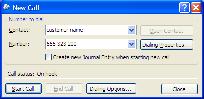
On the "new call" dialog select "dialing options", then choose the ActivaTSP line in "connect using line..." list box and press [OK]
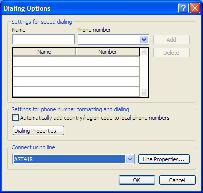
When you press [START CALL] in the "new call" dialog box asterisk will initiate the outbound call to the outlook contact telephone number: Your SIP asterisk phone will ring and after you pick it up, the outbound call will proceed. You may find useful to enable 'auto-answer' on your phone.
Also keep in mind that Windows dialing rules can insert digits/change the dialed number.
ACT!
Oct, 2007
Act! is a well known contact manager / personal CRM application that can use TAPI to dial outbound calls and also can popup caller record information for inbound calls.
It can be easily configured to run with ActivaTSP (tested with free trial of ACT! 2007 with TAPI.NET for ACT):
Check some options in TAPI.NET configuration:
· In TAPI.NET options, select TAPI tab and uncheck "working without TAPI".
· In Tapi Device, select the phone you want to control
· In Tapi Provider, select Standard
· Check "Use CallerID"
TapiCall
Oct, 2007
TapiCall is an interesting TAPI add-on to outlook and can popup outlook caller record information for inbound calls, among other functionality.
ActivaTSP-1.2.0.1022 and later should work with TapiCall
Microsoft Dialer
Oct, 2007
Look for Dialer under Start | Accessories or simply run it from command line as "dialer.exe"
Edit | options and configure "line used for phone calls" to use your ActivaTSP line
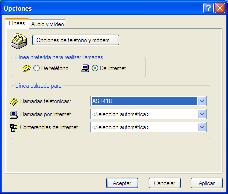
Then you will be able to use MS Dialer to initiate outbound calls.
Dialer will popup a window too when you receive inbound calls too.
